
[AI Tool Showdown] We compared 3 AI meeting note tools so you don’t have to. One of them is free.

TL;DR: Fathom if you want free and simple. Otter if you want the deepest features. Fireflies if you need CRM sync and your team is on the smaller side. Details below.
The problem we’re solving:
You’re in 3 to 5 meetings a day. You’re scribbling notes, missing half of what’s said, then spending 20 minutes writing follow-up emails from memory. An AI meeting note tool joins your calls, records everything, and hands you a summary with action items when the call ends. The right one saves you 5+ hours a week. The wrong one is just another subscription you forget to cancel.
The contenders:
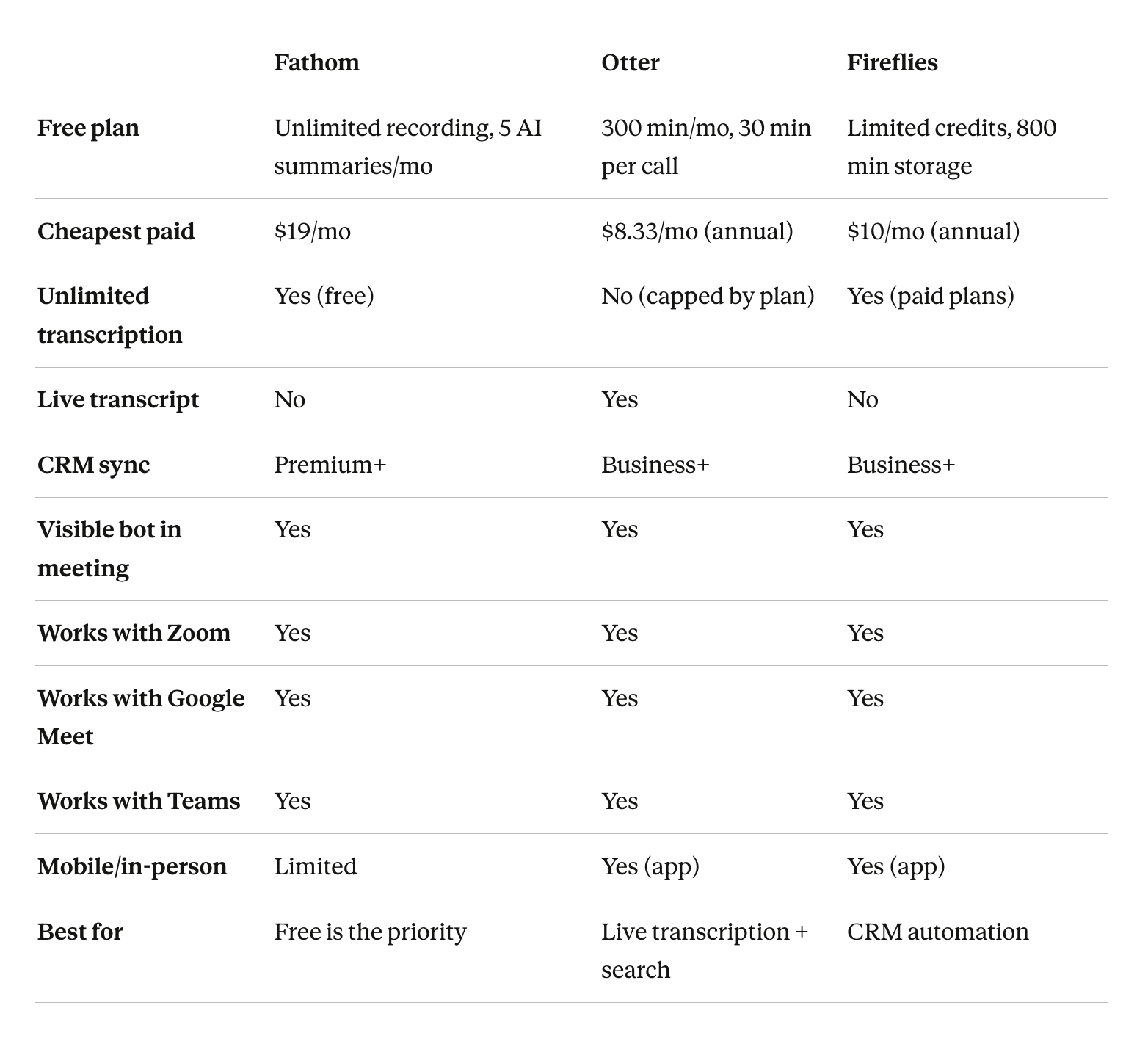
Fathom - Free (unlimited recording + transcription) | $19/mo for Premium
Best for: Solo business owners or small teams who want to stop taking notes without adding another line item to their budget.
Strength: The free plan is shockingly generous. Unlimited recordings, unlimited transcription, unlimited storage. No minute caps, no time limits. You get 5 AI-generated summaries per month on the free tier, which is enough if you only need recaps for your most important calls.
Weakness: The AI bot joins your meeting as a visible participant called “[Your Name]’s Fathom Notetaker.” Everyone on the call can see it. If you’re on a sensitive client call, that can feel awkward. Also, after those 5 free AI summaries, you’re reading raw transcripts unless you upgrade.
Setup time: Under 5 minutes. Connect your calendar, pick your meeting platform, done.
Otter.ai - Free (300 min/mo) | Pro $16.99/mo ($8.33/mo annual) | Business $30/mo ($20/mo annual)
Best for: Teams that want real-time transcription they can follow during the call, plus a searchable archive of every past meeting.
Strength: The live transcript is the best in the group. You can watch it update in real time, highlight key moments, and add comments while the meeting is still going. The search across past meetings is excellent. Need to find that pricing discussion from three weeks ago? Just search for it.
Weakness: The free tier caps you at 300 minutes per month with a 30-minute limit per conversation. Most business owners will blow through that in a week. When you hit your cap, transcription just stops until next month. No overage option, no flexibility. And the Pro plan still limits you to 1,200 minutes.
Setup time: Under 10 minutes. Calendar integration works smoothly with Zoom, Google Meet, and Teams.
Fireflies.ai - Free (limited credits) | Pro $18/mo ($10/mo annual) | Business $29/mo ($19/mo annual)
Best for: Small sales teams or service businesses that want meeting notes pushed directly into their CRM without manual data entry.
Strength: The CRM integration is where Fireflies earns its price. It pushes meeting summaries, action items, and deal-related notes straight into Salesforce or HubSpot after every call. The searchable meeting database is also strong. You can filter by speaker, topic, or sentiment across every call your team has ever had.
Weakness: The hidden cost is the AI credits system. Fireflies advertises “unlimited transcription” on paid plans, but the AI features (summaries, action items, smart highlights) run on a credit system. Pro gives you 20 credits per month. Burn through those and you’re either waiting until next month or paying $5 for 50 more. Several users have reported the real monthly cost ending up 2 to 3x the base price once credit top-ups kick in.
Setup time: Under 10 minutes. Bot joins automatically once you connect your calendar.
The verdict:
Pick Fathom if you’re a solo owner or a small team that just needs clean meeting notes without paying for another tool. The free plan alone handles 90% of what most business owners need. Upgrade to Premium later if you want unlimited AI summaries.
Pick Otter if you run a lot of meetings and want the best live transcription experience plus a searchable library of everything discussed. Just budget for the Pro plan from day one because the free tier won’t last you a full week.
Pick Fireflies if your sales or client-facing team lives in a CRM and you’re tired of manually logging call notes. The CRM sync alone can save 15+ hours per week across a team. Just keep an eye on those AI credit charges.
Skip all three if your meetings are mostly in-person. These tools are built for Zoom, Google Meet, and Teams. For in-person meetings, look at tools like Granola or the Otter mobile app, though accuracy drops significantly without a clean audio source.
Quick comparison:
Disclosure: We’re not affiliated with any of these tools. No referral links, no sponsorships. Just honest research. If you’ve used any of these, drop your experience below. The best recommendations come from people who’ve actually used the tool, not marketing pages.
Your move: What are you currently using for meeting notes? Or are you still doing it manually? Drop your setup in the comments.